




One of the best parts of modern life is the invention of apps. We didn't have to navigate disability in a world without them and find ourselves using them more and more regularly. Below, you will find some apps that may help make getting out and about less stressful and making planning a day out much easier.


Accessaloo is a free app that helps you find accessible toilets in real time. Whilst the locations included are limited, we still use it as our first step in finding loos suitable for Bob. There is a facility to add loos as well so the more it gets used, the better it will be for everyone! The app uses an icon system to make it easy to identify features for each loo and includes photos of the toilets for extra confidence.

The Changing Places Toilet Finder app is free and designed to make planning trips easier and take away the anxiety of finding a changing places toilet when you're out and about. It uses photos to show facilities and includes information such as opening times and who to contact if there are any issues with the toilet.
This is not an app we have used ourselves, so please feel free to send us some feedback about your experiences of using it.


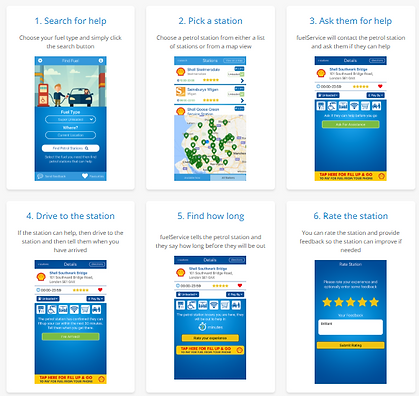
Refilling the car when you have a disability or additional needs isn't necessarily the simplest task. fuelService is an app that helps those who need assistance when refuelling their car find nearby petrol stations with assistance available. You simply choose your fuel type and a petrol station from either the map or a list and click the 'ask for assistance' button. fuelService then contacts the petrol station to see if they can help. If they can, you push another button that lets the station know when you have arrived. You are then notified of the wait time for assistance and afterwards you can rate the station and be on your way.

If you are leaving the car at home and fancy taking the train, try using Passenger Assist to get the extra assistance you need to make travelling less stressful. It's free and we've used it a couple of times, once to Edinburgh and once to London Euston. Both times we were able to access the assistance lounge away from the crowds and use the passenger transport to take us to our train when it was ready.

You simply fill in your profile with your needs (ramps, transport, seat reservations etc) and you get a confirmation of the services you have book immediately. To be honest, we wouldn't travel by train without using it now. It made our lives a lot simpler knowing all of those things were taken care of in advance rather than having to explain Bobs accessibility needs every 5 minutes to a new person.